2008-04-30

I have nothing but contempt for VC251

I really don't love writing excessively negative things, but I feel the urgent need to express my disdain for one of the classes I've had the "joy" of taking this semester, VC251. It took me two or three semesters to even get into the class, and as a result of EMF252 (the UTV62 class), I was unable to take it in-person, so this semester I was finally able to get into (and therefore even able to consider settling for) an online section of the class.

To put it lightly, Online VC251 is a special kind of hell that I would never wish upon anyone, unless they didn't have other classes. The entire course, which is conducted via WebCT Vista, is very poorly organized, and the bulk of the instructional material comes from these two books we were told to buy, Adobe Photoshop CS3 Classroom in a Book and Adobe Illustrator CS3 Classroom in a Book.

So we work through the lessons in these books, which in a way, are very remedial and basic lessons, which serve almost more as an introduction to the very concept of "photoshop" and "illustrator." And immediately thereafter we're expected to do a complicated project involving type, compositing multiple photographs and a poem. A poem! For the Illustrator section, we learn selections, layers, LiveTrace, creating some simple shapes, and a few other little things, and immediately thereafter we're expected to trace a comic book cover.

A few very fortunate people were able to find very, very simple comic books, with no shading of any sort, no background to speak of, and only one or two characters with maybe one prop. Unfortuantely, after three or four pages of google image results, all I was able to find were hellaciously difficult comic covers. Add to that a lack of any real text other than the title, and you've got a manageable assignment. Unfortunately, since we were told to find our own comics, and I didn't want to spend three hours looking for that simple comic, I ended up using a quite difficult comic to trace. Hilariously enough, one involving fair use. The original image can be seen here.

And this was just a few hours before it was due, because I'd forgotten it in favor of completing projects for my in-person classes, taking calls, and other miscellaneous shenanigans. So I started looking at the image, and realized that the assignment involved tracing with Illustrator's pen tool. "oops."

A lot of this was my own shortsightedness, needless to say I really should have skipped out on both weekend overnights, and classes/work on Monday and Tuesday in order to work through the project and get everything done. I think that with that much time, working straight through, I might have gotten a simple version of the image completed. I ended up using Illustrator's Live Trace tool, which we were "kind of" told not to use. I got the image done and it looks great, but I'm not sure what kind of grade I'll get on it.

The project in and of itself is not too bad an idea, although I think it's totally inappropriate for a Freshman VC class, and almost more importantly, I'm fairly certain that the class itself is totally inappropriate for freshman Photo majors. In a pre-PHO382/199/282 era, I bet it's main purpose was to introduce Freshman/Sophomore photo majors to the idea of Photoshop, but between what we learned in my 382 class, and the fact that I've already worked through several incarnations of the Photoshop CIB during high school, the Photoshop part of the class was really easy.

I think the projects for Illustrator have been hellacious, unnecessary and completely out of line, as far as the actual skill set of someone meeting the prerequisites for this class are concerned, and a more appropriate tutorial, like something involving an actual comic, and something being an actual tutorial, would have been very much appreciated.

Purely for the purpose of making sure I know how to use Illustrator, I may this summer go back through the CIB on it, although as a result of my contempt for and disappointment with VC251, I may just trash all of my files related to the class and pack the books away somewhere.

I really am disappointed that this is how I end the semester... with such strong contempt for this class, but I feel cheated, having paid the tuition and lab fees for this class, when about 90% of the learning materials were a pair of $50 books from the vendor of the apps in question. The class itself was very poorly organized, so if the instructor did provide any information, I never found it until it was too late. That, and I've always thought the entire point of an online class was the ability to work at your own pace, and see everything coming up in advance. I don't even think this class had a syllabus, and if it did, there was no warning at all about the assignments coming up.

Don't take Online VC251. Trust me, and if you don't trust me, trust Brandy. If you have to take VC251, do everything in your power to take it in-person, even if it costs you more in supplies, or in printing.

2008-04-29

Photo365

Last night Megan linked me to an article on the PhotoJojo site, detailing a project that anyone can do called Photo365. If you've been looking at my flickr feed, you're probably fairly well-aware of the fact that I use my iPhone to take photos and post them online quite often.

Although, I wouldn't mind a good excuse to carry around the D300 a bit more often. And it sounds like there's gains abound to be had while participating in the Photo365 project -- Especially the part where...
Taking a photo a day will make you a better photographer. Using your camera every day will help you learn its limits. You will get better at composing your shots, you’ll start to care about lighting, and you’ll become more creative with your photography when you’re forced to come up with something new every single day.
Although I can't really start right now with it, I'd really like to start this summer, and hopefully be able to keep up with it next school year. Although I've been pretty good at blogging every day, I know that taking photos sometimes becomes difficult for me, because it's not really something I can do during classes. (Although between-class photos are better anyway.)

So I intend to start the project over the summer, I am probably going to either get Flickr Pro, or set up my blog on the U60, but that's a project for the summer, rather than posting every image to Blogger or Flickr. Things to consider later on, anyway.

2008-04-28

Cleaning the Lab

I've been working Meaghan's overnight shift, and somehow randomly decided it would be cool to finally go ahead and clean up the lab desk area. I'm not going to lie, I enjoyed it. Probably a little bit too much, but it's something I have wanted to do all semester, and having done so gives me this weird feeling of accomplishment.

The main inspiration to clean the lab desk was the note put up by the South Lab director, saying that the Overnight people are to clean the lab station. My big problem with this is that there seems to have been no actual communication between Labs staff and Academic Computing Help Desk staff in this decision.

After having gotten it done and having gotten everything put back into place, I feel like I should have done this a very long time ago. The whole area was very grungy, and extraordinarily dusty. Being a bit of a clean freak myself, I'm not entirely sure how they were able to stand it day in and day out, the main thing is that there were massive amounts of used staples and huge piles of old dust. Not just dust, I think much of it was old dust.

They didn't just have dust. It was very, very old dust. Old dust that was probably last addressed in 2005 or so when the OptiPlex GX270 machines SCLLAB1 and SCLLAB2 were brand new. The cables were disorganized and a mess, and the workspace suffered from pretty terrible choices in the exact placement of the machines.

I even re-did some of the wiring on the left computer, whose wires were very badly messed up. A nifty little advantage of the re-wiring is that the overnight staff can pull the phone out a bit more to get easier access to it while on a call and printing at the same time. It may be fine for the daytime lab staff that shouldn't be on the phone.

Over the summer I'm kind of going to miss this desk, especially now that I've put so much effort into de-grunging it. Ah well, at least I won't have to suffer the moral question of whether or not to let a student sans-ID into the lab before 8 a.m.

2008-04-27

The Shot

Earlier this morning, I finished watching the VH1 show I downloaded from iTunes, The Shot. In The Shot, eight or so people competed to become the next big fashion photographer.

The production values of the show weren't that great, even in the last episode I was distracted by a few audio problems, but I don't necessarily think high production values were the goal of the show. As a show about photography, I think it succeeded as a show about photography, although I don't think it was necessarily meant to appeal to people actually doing or studying photography, except as a general broad-strokes type of thing. It's intended audience really probably was "people who watch VH1." Although I'll admit that one of the biggest reasons I liked it was the drama, and because that first episode was free on iTunes.

Anyway, my favorite of the contestants ended up winning, which was cool. I think this was the first time I kept track of a "reality" show from beginning to end (albeit after the fact, I think the show is a year or two old by now.)

2008-04-26

Reinstalling Vista

Well, I finally got what I perceive to be "enough" time to go through and back up all of the data from the ThinkPad R61i, and reformat the thing to get a fresh install of Windows Vista Ultimate. Everything was getting slow and quite disorganized, so I figured I'd go ahead and get everything cleared out and set back up. Mainly, I want to be ready for my trip this summer where everything will need to be fast.

Another big concern was that I've been somewhat irresponsible in the management of my Vista system so far -- I wasn't sure for a very long time of exactly which software I wanted on the machine, so I ended up uninstalling and reinstalling a bunch of different pieces of software several times. That, a few mistakes with some developer tools, and the upgrade from Home Premium to Ultimate kind of caused things to become disorganized in the system. My intent after this reformat is to keep everything going well not only for the summer, but for Fall 2008 and Spring 2009 as well.

Maybe it's a bit of a far-fetched goal, but for this install of Vista to last until Fall 2009 would be pretty great. I've had Mac OS X installs last that long, so my presumption is that if I do it right this time around, I can have the setup last quite awhile.

Another thing I'm doing to try to increase the longevity of the install is to actually keep up with a backup regiment. In the next week or so after I find and install all of my favorite utilities, my intent is to make a master backup onto DVDs that I can fall back upon if necessary. In addition, I'm going to be doing a complete PC backup on a weekly basis.

For software, I'm going to go with Outlook for mail, and I'm going to try to find a Calendar connector for the Oracle Calendar setup. For productivity software beyond Office, I can't think of anything I really need aside from the Adobe Creative Suite, which I'd like to buy for the Windows machine at some point. (Although until then, I'll just do Photoshop CS3 on it's own, because getting all of them is quite bothersome.) I'll probably grab XChat and Pidgin, and a few other little utilities like the VNC client and whatnot will fall into place over time.

So here's to keeping my Windows system running better!

2008-04-25

Overview of Summer Server Shenanigans.

This summer, I'm getting three machines that count both as desktop personal computers, and will probably be used as server computers. The first two, and almost the more important two, are the two Hewlett Packard e-PC units I'm getting and will be using. They're Pentium III computers running at about 1.2GHz, and if I remember correctly, mine will have either 256 or 512 megabytes of memory. The second, and almost certainly the more powerful and versatile of the group, is a Sun Ultra60 UNIX workstation. The U ltra60 is to have about a gigabyte of memory, and two 18-gig SCSI hard discs. It's also got a DVD-ROM drive to make installation of Solaris 10 more easy.

On the two HP e-PCs, I intend to install Windows Server 2003. One of them will run IIS and SharePoint services, the other will be the primary domain controller. (I'm inside my own LAN, don't worry!) I'm not exactly sure how all of the services will shake down onto the two machines, but I think it'll go like this:
  • Machine 1
    • Primary Domain Controller
    • Terminal Services.
    • Distributed File Services
  • Machine 2
    • IIS/PHP/MySQL/SharePoint
    • Exchange
    • Distributed File Services
My intent is to learn even more about networking with Windows Server 2003, which I am getting through Microsoft's DreamSpark program. I'd gladly try out Server 2008, but it looks like that particular piece of software is not yet available through DreamSpark. I'd try it via MSDNAA but CIS120 didn't give me proper MSDNAA access.

My other evil plan is to test Windows Vista, Windows XP, Windows 2000 and Windows NT4 clients to the domain in virtual machines, to see how everything is set up, and how everything works on the different operating systems. I even intend to see how well the two e-PCs might work for hosting the UeberLandoWiki.

The Sun Ultra60 will be used directly on resnet, for maximum speed and reliability. My intent is to use this machine as a standalone web server, and web development server -- especially if I go ahead with learning some PHP this summer. We're going to put the UeberLandoWiki on the U60 and host it here at NAU. With luck, because I can just dump the U60 in the closet and leave it running, ULW should stay up pretty reliably. We can even point the domain at it's IP in my room.

In another year or two, I may consider moving ULW onto the Windows machines permanently, although for now it'll just be rocking out on Solaris' CoolStak AMP stack. ULW works quite well on the U60, so I don't expect to really need to move it around, although just for good measure, I probably will. Mainly, I want to test it in Windows 2003 on the e-PCs, along with maybe Gentoo or Debian Linux on one of the e-PCs.

I'm trying 10.5 Server out on the iMac pretty soon here, and I'm pretty excited to see how well 10.5 server works. I do wish I had another machine to use as a 10.5 client, but I think we should be fine with just having a 10.4 client to authenticate against it. I'm also pretty excited to see how well ULW will run in a 10.5 server environment, without MAMP. If it all works well, I may consider overlaying my 10.5-client install with 10.5 server, to keep some of the cool server things going.

So that's what I'm planning this summer, as far as some of my server projects go. Most likely, in a future summer, I'll combine the functions of my web server and my Windows servers into a newer box running Server2003 or Server2008, but that's for later on.

2008-04-24

Rent, & Other Summer Plans.

Well, as a way to celebrate the end of the semester, Megan and I are planning on going to see Rent on Sunday, May 11th, down in Phoenix. I'm not sure of the details yet, but Megan really wants to go, and I do quite like Rent too. We're going down to Tucson on Friday after my last normal Spring2008 shift at the helpdesk, hanging out there for a bit, and then Rent on Sunday, and I'm taking the Flagstaff Express back to campus, in time to get some sleep before the first ACHD shift of Summer, 2008!

Also, I am still REALLY ready for the summer to begin. I've started having heartburn, VERY frequently, and I think it may be a result of the stress of almost the end of the semester.

This summer I'm working 20 hours a week at the helpdesk, and I'm not taking any classes. As far as I know I'm not going to be working any other on-campus jobs.

After Rent, I intend to reformat the ThinkPad R61i with a fresh install of Windows Vista Business or Ultimate, mainly because since I did the overlay from the included Home Premium to the Ultimate disc I have.

The other thing this summer I'm doing is taking a train trip from Kingman to Michigan for a few weeks to visit grandma. My brother's coming with me on the train, both ways, so I'm really not sure how that'll work out, but at least there's only one 23-hour layover, the one going East.

With the new backpack, the D300 and the R61i working properly, this trip promises to be pretty great. I can't wait to get daytime Amtrak photos, and of course it'll be great to have my photo workflow to use on my family members.

Another cool piece of technology I intend to bring is the EDGE data card for the R61i. I'm going to use the EDGE card to put photos on Flickr and make posts to the blog during the trip -- I may pre-write and schedule some posts for each end of the trip though, just in case I don't get any time to do so on those days. If I do get some time to write those days and need to go ahead and post something, it's really easy to use Blogger's interface to move something out even further in the future.

Other than that, my plans include "not having a roommate," "hanging out with Meaghan," and "lots and lots of photography." I also intend to "not move at all, the whole summer."

So I'm pretty excited about that.

2008-04-23

Engineering Building

Today was the first time I dared to venture into the Engineering building. After my trip to the Lab Sciences building the other day, I was feeling confident that I could go and get some compelling images of the fairly newly remodeled building.

I got a few great outdoor shots of the building, and a few other random things on South Campus, but I don't feel as though I've done that beautiful building justice. I need to work on both the Engineering building and the College of Business Administration this summer, because I think I can get much better images than what I think I got today.

Although the adventure into the Engineering building did afford me an interesting opportunity to take a look at some of their systems. They've got a bunch of Sun Ray 2 thin clients hooked up to a little farm of terminal servers, and you can select at the machine whether you'd like Windows, UNIX, Linux or just a web browser (which I presume is firefox coming in at full screen off of a Linux system, but I didn't check.)

The setup they're using, with terminal servers and the thin clients is pretty clever. In theory, your thin clients stay modern for a very very long time, and they're extraordinarily low maintenance. Add to that, the fact that you can terminal into different systems, I think the thin client setup, especially in the College of Engineering where it's fairly quick, is a good winner. The only problem I can see is that there are a few instances where network bandwidth isn't really good enough to support a lot of thin clients. The W.A. Franke College of Business Administration has some problems with it's SunRay clients because, I suspect, of high server loads or slow network connections. The size of the display may also have something to do with it, as the CBA runs very large 24-inch monitors on it's thin clients, while the thin clients at the Engineering building were running at 1280x1024.

One of the only negative things I can think of to say about the thin client situation is that I would really like it if Apple or some third party Mac vendor were to get everything set up so that Mac systems can be used by thin clients.

Ahwell, just dreams I suppose.

2008-04-22

Ready for Summer.

This post was delayed in favor of my previous post, "State of the MLA."

This is just a quick note to let everyone know that I am, in fact, ready for summer to start. The overnight shifts are great, but I haven't worked both of my own overnights on any regular basis since before going to the Renaissance Festival back at the end of February. That, and either the homework really is worse this semester, or I've just been letting it all pile up in awkward ways, because it seems like every two weeks, just when Megan seems to want my time the most, I've got large piles of homework due.

After finishing the German project I keep forgetting to work on, and getting done with everything else, my intent for the summer is to get on a regular sleeping schedule again, and work on some of my projects, such as my rationalization of my blog categories, getting the Sun Ultra60, and working with Windows 2003 ActiveDirectory.


Also, I'm quite ready to be done letting people without IDs into the lab. Apparently this pair gets into the lab often at this time without IDs, so either they know one of the other SCAs, or they just come on different nights, and then make it halfway into the lab before mentioning that they know about our ID policy. How infuriating.

2008-04-21

State of the MLA.

I am a moderator on an internet discussion forum called the 68k Mac Liberation Army. It was founded in 2001 or 2002 by a few people with a bit more than an average interest in older 68k [motorola processor] based Macintoshes. I joined sometime in 2002 or 2003, and in late 2007, I became a moderator.

I had another post scheduled for today, but I think this is a bit more pressing and important than a post about how far away summer seems to be.

The following is something I have posted in the moderators-only section of the board. It's modified for public consumption, because the original post is a bit more abrasive.

Over the past few weeks, I've seen more than seven instances of "f***" in the Lounge on the forum, specifically from two users. [I'm sure my audience is mature enough to handle a bit of profanity, but I'm not putting it here, simply because I think it's rude and in poor taste to be so coarse on-line. I know, it's "just the Internet" but I consider the Internet not to be completely informal, but rather, to be a freakishly formal collection of everything. ever. So I find it important to communicate as effectively and cleanly as possible.]

Do we [The moderators and administrators.] have an exact policy on how we deal with things like this? I know in the past when I've tried to edit out some profanity, it was edited back in -- but it was my understanding ever since I joined like six years ago that this was a family friendly forum.

I'll admit I've had my fair share of bad days, and therefore one or two profanity-filled lounge posts (in 2003 though!) but I think the way the forum is getting these days is downright ridiculous.

It's gotten to the point where I don't want to read the new threads in the Lounge because they either seem pointless, completely overdone, or something that simply can't under any circumstances end well.

Is anyone else bugged by this? Wasn't there once some time when the MLA didn't receive seven f***s each weekend, and when our self-governing capabilities were basically in place and activated.

Is there some secret of zen moderation that I'm not aware of that'll cause the whole thing to balance out and the 68kMLA to once again become "happy" if we just let it run it's course?

Almost more importantly, is there something we can or should be doing to sort of guide the community back into having the expectation of needing to behave properly? I'm all for the idea that the occasional rude word isn't going to kill any of us, but I think it paves the way for the mindset that posts composed entirely in profanities is an acceptable mode of communication, and that's a dangerous way to go because that's when I start unashamedly deleting posts out of the middle of threads.

I know that the IRC and the forum are basically distinct and separate entities, but when the IRC channel gets out of control, I typically shut that shenanigans down. I lock down the channel with +m [+m is a mode where only the operator (irc word for moderator) of the channel can speak.] and lay down the law. I've had to do it a few times, but ever since laying down the law a few times and banning a few of the very worst behaved people, the channel has been keeping itself mostly pretty well behaved.

To put it shortly, the IRC channel is now on better behavior than the lounge on the forum, which mainly goes to show how bad I think the lounge has gotten.

So what is the state of the 68kMLA, and what, if anything, will we do about it?

2008-04-20

HP/Compaq 2133 Mini-Note: Much Potential

blag-HP7875 Recently, Hewlett Packard has introduced a really interesting product, the HP 2133 Mini-Note PC, which falls into the UMPC category. The top end configuration, which has two gigs of ram, a 160 gig 7200rpm hard disc, and VistaBusiness, is just about $750usd. Definitely not bad. I paid just about that much for my ThinkPad R61i, which would be spilling over all sides of that stack of books. Although the main failing of the machine is it's low battery life when using the 3-cell battery, along with the Via C7M processor.

In general, this thing is what I really wanted the MacBook Air to be. The keyboard isn't 100% of full size, but it looks like it's big enough, and the 8.9" screen is a generous 1280x768, just 32 pixels shy of the resolution my ThinkPad's 15.4" screen displays. If I didn't already have the ThinkPad R61i, I would want this to be my next mobile computer. Heck, even though I do have the R61i, I want one of these as my next portable, since I personally tend to want to let my desktops do all the heavy lifting with apps like Bridge and Photoshop.

The machine is also available in a few other configurations, including a basic linux model with a 4 gig SSD, half the ram and a slower processor, for less than $500. As someone who is always interested in how to improve the integration of computers into an education system, this machine struck me as a great machine for a one to one laptop program, at almost any level.

My initial idea involved a Windows Server 2008 domain, the high end 2133, and a bunch of the other pretty cool Microsoft technologies. The one non-microsoft piece my idea specifically calls for are Apple Airport Extreme base stations, mainly because when you've got a bunch of them on the same LAN, you can set up what I get the impression is one seamless wireless network where client devices can move from AP to AP without much fuss. But that's just a big presumption on my part.

The basic setup is pretty simple, Vista Business on each of the 2133 machines with a fairly healthy complement of Microsoft software, Office 2007, Outlook, Office Communicator, and probably a few auxiliary things such as SharePoint Designer. Each machine (the standard image for the machines, really) is set up to authenticate the user against a main file server, and if a network connection is not available, to use a locally cached copy of the profile.

Look at how happy he is! Unfortunately, that's just about where normal laptop integration programs end. One thing I would like to see is the availability of charging docks for spare batteries. The ability of the mass charging docks to display the charge status of each battery hanging around would be great, and the charging docks would also be on the network, so administrators can keep track of each battery's status. The idea here is that as students move throughout their day, they can just exchange their battery with a fresh one from the charger.

One big modification I would make on the traditional NT-Domain client/server model would be the location of home directories. This requires a bit more effort, but in my network, each user's home directory would be stored primarily on their own notebook, with periodic synchronization to a storage cluster.

The big advantage to this is that the student can always be sure their data is with them, and in the event of hardware failure, the student can get their entire home folder loaded back into a replacement unit, or back onto a new hard drive. Another potential advantage of this, if everything is set up correctly, is that the student can sit down at a full-sized desktop computer, hook their Mini Note up to electricity, and to the school's wired network using the onboard gigabit port, and log into their account using a desktop computer. The desktop loads the profile very quickly from the Mini Note over gigabit, and the student is seamlessly working with their data, but in a full-sized environment. In an environment like a school newspaper, yearbook office or photography classroom, the student can keep their data on their own machine, but let a more powerful desktop computer with a larger screen do the heavy lifting.

Here's one more little change I'd make: Because the gigabit ethernet and the power port are both on the same side of the mini note, some kind of dock you just slide the mini note into would be ideal for a setup like this. Either one station with the capability to hold a number of mini notes, or individual stations to each mini note can sit with the student at the desktop computer.

It's like a fashionable version of the eeePC, but it runs Vista and has gigabit Ethernet. Student's data is with them always, and presuming the school even has desktops anymore, after implementing a one-to-one program, the student can easily access their home profile and information from the desktop computer as well. I'd say we're going pretty well.

Another thing I'd like to see though, is hardware monitoring for the administrator. Give the system the ability to send information about the hardware to the administrator, such as the s.m.a.r.t. status of the disk, and information from other sensors in the device, so as to let the administration know in advance if a machine will need replacement parts, or to be replaced.

I'm big into collaboration, and Microsoft has a lot of products out there just for that, many of which I really want to try out at some point. The most obvious collaboration product Microsoft has got is Exchange and Outlook. For well-trained Jr. High and High School students, a well-maintained Exchange setup could mean the end of "retarded" paper-based planners, and the beginning of just opening the Mini Note in order to check the calendar for their particular class to see what assignments are due at what time.  Students can either add to and maintain the calendar as they see fit, or calendars can be created for each section of each class, and the instructors can add and maintain items visible to each of the students.

An Exchange mail setup also means students have a quick and easy way to contact their instructors and each other in order to get details about assignments, get help, or ask other questions. Microsoft Office Communicator can be used in much the same way as Windows blag-MG8041Live Messenger, to create group chats of students in the same class, and to collaborate on projects during work time.

In lieu of a traditional courseware management system, SharePoint sites can be created for each class, as a way for the instructor to share downloadable files, lecture notes and calendar information for the students and parents to see. Students can also use SharePoint Designer to create personal pages and post information for other students to look at.

Much of what I've described really applies most to university students, as I doubt most high school students are interested in e-mailing each other, collaborating on projects, or even using the machine for anything other than music and MySpace. Unfortunately, many university students are the same way, but there are still situations where such a setup would work, and even if none of the users of a system take pleasure in the way it's set up,

A simplified version of the setup I outlined would do away with the desktop computers and the docks to hook the 2133s up to when using the desktops, but I would still retain the communal battery chargers and the ability for the systems to call home to provide status updates to the server.

Cool ideas, usable on any laptop, but you'd have to have something where you were sure the vendor was going to be using the same batteries for quite a long time. Unfortunately, unlikely to happen anywhere.

Ahwell, the machine still looks like it'd make a great tiny thing on which to run OneNote, and be easier/smaller to carry around than the ThinkPad R.

All of the images used in this post are copyrighted by Hewlett Packard. They were provided by HP in a media kit. I wish I was that good at cheesy product/portraiture photography.

2008-04-19

Impending Switch Canceled

Well, I'm just not sure what to say. For about three months here I've observed a very huge difference between Adobe Bridge on my Mac and Adobe Bridge on my PC. For quite awhile, my impression has been that Adobe Bridge runs better on Windows than it does on the Mac. My guess at why was mainly as a result of how Adobe must work in order to maintain the same code base on Windows as well as the Mac. Unfortunately, while working on keywording some of my older images earlier this morning, I found out that I was terribly terribly wrong.

It turns out though, that what's actually happening is that either version of the program starts to become erratic and unpredictable in it's behavior with keywords once you've started to add some keywords to your keyword database.

I am both severely disappointed, and quite happy about this. First off, it means that basically I've been complaining needlessly for the past several months. The PC and Mac versions of Bridge suck equally! The great thing about this though, is that it doesn't necessarily rule out Mac OS X as a computing platform for me in the future. I had no serious plans to run out and replace the iMac in the next year or two, but in the past month or two, but I had been giving serious consideration to making my next new desktop computer a Windows PC, and I'd been researching the various vendors of Windows hardware, and preparing myself for the cost of a decently well-configured Windows-based computer, based on today's systems.

I'm not ruling out a Windows machine as my next computer, nor am I ruling out continuing to test Adobe CS on Windows as well as the Mac, but it just makes a switch to Windows much less necessary.

I'll end this post with this one last statement: GAH... Really, Adobe? Really?

2008-04-18

PowerBook 520 and 520C

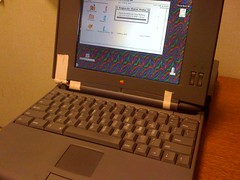
I know this is kind of a copy of my post on the 68kMLA Forum but I just thought I'd let everyone know that I picked up a few more PowerBooks. I just thought I might let everyone know about my recent actual liberation, from NAU's surplus store, two members of the 500 series of PowerBooks.

photo.jpg

These are immense machines, they're bigger, thicker, more rounded, and have in general what feels like more horsepower than the PowerBook 180. Although I think much of this is just a result of becoming a bit too complicated, because they both have hinge problems of varying difficulties, and while the PowerBook 180 has some battery life, neither of these machines, despite having two nice-looking batteries each, has any life in the batteries. These seem to suffer almost from too much engineering, like a modern version of the Mac Portable, where if you don't maintain them "just so" they would be difficult to keep going, especially as mobile computers. It makes me wonder what sort of maintenance or treatment would be necessary to keep one of these machines running properly.

Anyway, configs!
The 520: 20 megs of ram, 120-ish meg hdd.
The 520c: 36 megs of ram, 1000-ish meg hdd. Global Village Modem.

Both are running system 7.5, and both are (other than the hinges and batteries) fully working. Which really surprised me, for $10-for-both from a university surplus sales store.

Once I get home for the summer I'm probably going to reformat them a bit and put clean installs of some older software on them. I might try to find the 520/520c original install discs and drop 7.1 on them, not completely sure yet. My other project with these machines will be to fix the hinge a bit on the 520c, and to see if I can't get any life at all out of the batteries. I may also try to source a second power adapter, because right now both 520s are sharing the same adapter.

Another interesting tidbit: These machines still had user data on them, research from the French department on this campus, I believe. It's all French stuff though, I don't even know if any of it was typed in English, so it's not terribly interesting to look at, or read.

I'm pretty excited about these machines and the 180, it's nice to be able to have some 68k power with me here at the university. This summer, I intend to try to find some more of my software and accessories for PowerBooks. I'm sure I've got an HDI30 adapter, and I'll probably bring back the external scsi hard disc, and-slash-or the USB floppy drive.

2008-04-17

PowerBook Updates

Well, I've officially received the first of two packages I've got coming from one of my online friends in the east. This particular package, which I suppose I consider to be the more important of the two, at least immediately, contained PowerBook related paraphernalia.

The first item of interest is a PowerBook 180. It's got a cool 16-color grayscale display, 14 megabytes of memory, and a 120 megabyte hard disc drive. The keyboard is very typable, and the trackball is great. I like the trackball almost as much as I like the TrackPoint on my ThinkPads. I can't wait to get some of my older System 7 era software loaded onto it, although that probably won't happen until summer when I go home for a bit.

The other, almost more important item, is the power adapter from a PowerBook 3400c. It's going to be used on my PowerBook G3, which can still achieve a 5 hour battery life, when it's got a power supply hooked up to it.

The timing on the G3's new adapter could not have been better, either. I'm going to be using it as my main mobile computer again for about a month or two while I coordinate backing up all of my data, finding the installers to all of my applications, then reformatting the hard disc of my ThinkPad R61i. It might be worth using another blog post to cover this, but the R61i's been having a few little issues lately, as a result mostly of my recent "upgrade" to Windows Vista Ultimate. I'm going to do a bit more research on the issue and decide whether it's worth it to try to use the same Vista Ultimate install media, or if I should reinstall the machine's bundled Home Premium, and look into doing AnytimeUpgrade.

More on the ThinkPad later though.

2008-04-16

The Writing on the Sidewalk

One of the great things about our nation is the freedom of speech.
One of the frustrating things about people in our nation is the freedom of speech.

Here at the university, a lot of people have been practicing their freedom of speech by writing a variety of messages around campus, on the ground, in chalk. It was mainly on North Campus last year, and the messages displayed were happy things like "Smile, it'll help the world" and "You're beautiful, no matter what."

Once the snow started melting, it was obvious that all of the multitudinous, cheerful old messages were replaced, and they've been replaced with a combination of propaganda, moderately rude or destructive messages, as well as messages pertaining to Sexual Assault Awareness Month, which April apparently is. In addition to awareness of sexual assault, there's been a large amount of political messages regarding things like the war in Iraq, and some campaign messages for John McCain in '08. (Campaign messages I don't support.)

I was really into the messages of love, joy, acceptance, etc scattered playfully around North Campus, but the latest batch of chalk writings are really frustrating to me. I find them distracting, much too politically charged, and I think that they degrade the mood, not improve it.

Attached to this post are two photos I've taken of the chalk drawings just out in front of the School of Communication. The sexual assault people have canvassed some parts of campus pretty well.

Chalk Drawings.

more chalk

2008-04-15

Diety of iPods

Note: This post was pre-written last night using a feature in the latest Blogger In Draft version of the Blogger Dashboard.

Well, I've just now fixed what will officially be the second iPod I've repaired. I reattached a little cable in formerly-Megan's 4th generation iPod (20gig.) I can now load songs into it and play them! I think there's still some pretty massive hard disk damage, but the songs it does play, it plays loud and clear through the headphone ports.

The other iPod I've repaired was Megan's 5.5th generation iPod with video (80gig) which I transformed into a 32-gig SSD based iPod. For now, we'll call it 5.7th Generation iPod with Video. I eventually need to decide whether or not to go ahead and replace the hard disc in this 20gigger, and then I need to decide whether I want to go the compact flash route, or with another rotating drive. (I've even been considering replacing the hdd in my 5.5th Generation 30GB iPod with a 32 gig CF card, mainly for the increase in battery life, but for now it's fine as I use it so little, and when I do use it, I'm pretty careful with it.)

Another recent repair is the Mighty Mouse that was included with my iMac. I've got to start using the Logitech mouse with the R61i for awhile, as a result of it's recent aversion to properly working with the TrackPoint. Unfortunately, I think it may be time to give the R61i a clean install, especially now that I'm set in the software I'm using on Vista, and won't really need to run around installing and uninstalling every other piece of software I see, which I think is one of the things that killed it.

As another note, this post is being written on my iMac with Blogger's "in draft" post manager. It's basically exactly like the normal Blogger dashboard, except it supports scheduling of posts. What I wonder myself is when this particular feature will trickle down into standard Blogger. Almost more importantly, I wonder when Windows Live Writer will be able to take advantage of it. I'd really like to start being able to pre-determine the exact release time of some of my bigger project articles, many of which have been late as a result of me not being able to be online or at my computer when I wanted them to be released.

Worth noting: I can imagine the blog being very, very epic this coming summer. My intent is to really step up my game as far as finding things to write about, and with some of my project posts. I've got the Digital Imaging Series, which I will probably re-write, and the Advice for College Students, which I will probably rewrite, if I've got any of them written by then. I also intend to do a series on Computer Networking Technologies, and of course, my venerable series, which will inevitably receive a re-titling and re-working, Helpdesk. (Actually, I don't yet have a series called Helpdesk, but one of the things I'd like to do on my blog is start separating the types of posts a bit better, and one of my projects on the blog seems to include writing about my job at the ACHD.)

Also, Happy Birthday, Megan!

2008-04-14

Obscure PC Components.

One of the things for which I have very recently realized that I should be very thankful is my Lenovo ThinkPad R61i. It's not that I should be thankful for it in the way you are for Thanksgiving, or in the way you are for another person, or even a really meaningful gift.

Instead, I'm to be thankful that it's such a great computer, despite the fact that I bought it retail, with almost no prior research on the specific SKU, and with no knowledge of how Windows Vista was going to run on it. I am sure that had I bought either of the machines to the left or the right of the R61i on that display shelf, I wouldn't have gotten the experience I did.

The reason this is important is because of the reading and research I've been doing lately about Windows Vista, and the launch of Windows Vista. It turns out that if your PC has an older chipset, some things just never work properly. Unfortunately, I've met a lot of people to whom this has happened, and even today, I'm fairly certain low end notebooks are still available with 945 and (I wouldn't be surprised at least) 915 chipsets. The unfortunate thing about that is that Windows Vista has a poor experience on some of the machines based on older chipsets, mainly as a result, as per Intel, of Microsoft's lack of communication about the requirements for the WDDM driver model, which is a big part of how Vista provides the Aero/Glass user experience.

Luckily, the R61i uses the decidedly modern Intel 965 Express chipset, and has the Intel GMA X3100 graphics chip, with shared ram. Not that I knew that when I first got the machine, to me it was just "oh, ThinkPad, these are reputable machines, and I need to learn Vista anyway." Luckily, it's been great for more than just notetaking with OneNote 2007, and merely "learning Vista."

Unfortunately for the "average" PC buyer, this means that a lot of PC purchases will be made on the faith that the consumer is getting what they paid for. Unfortunately I think that that is the very problem right now, that consumers are getting what they pay for, and in many of today's sub-$600 computers, that means old technology. Typically I've found the budget PCs to be usable when you get some of the "bundled offers" removed from them, but with the transition to Vista, what I've noticed is that there haven't been enough improvements quickly enough to the lowest segment of the computer market. The lowest end desktop PCs today can't competently run Vista, more than a year after it's release, which I find to be disconcerting.

Unfortunately, I think that this part of the industry is behind. Not just in the "oh, but it's a $399 computer," way. I think it's further behind than it should be, and it's really disappointing that as a result of the vendors' inability to bring their lowest end computers up to reasonable Vista spec, Microsoft has to continue offering XP for sale to OEMs.

This is something I think people need to have more awareness of, even if it takes longer in a class to go over various chipsets, and how to look for what chipset a computer has. Not just chipsets either, I would be much happier with a basic computer class at both the university and the high school levels that went over all of the components in the system unit in detail, and helped students understand sale ads, researching systems to find a system that really does meet their requirements.

I think putting more focus on the "obscure PC components" would produce more truly computer-literate people, especially since most people already know a lot of the basics about computers, such as the fact that a keyboard can be used to enter text into the computer, and that once you've entered text into the computer, your monitor, which operates like a television, displays that text on the screen.

2008-04-13

Yes, you really do need your ID.

Today, for the first time this semester, I actually turned people away for not having their university student ID with them when trying to get into the lab.l The official rule, as far as I'm aware, is that we are supposed to check for IDs on every student from the hours of 11 p.m. to 8 a.m. What I usually do is quite far from it.

Usually I tell people that they need to have their IDs, they tell me they forgot it and could I let them in anyway, then I do and tell them to bring it next time. Luckily most people either only ever come to the lab once, or just learn to come before 11 p.m. I know several users who make an effort to be here before the doors lock, often at about 10:45 p.m. for whatever reason. My guesses include a disliking of confrontation, not actually being an NAU student, or intents to stay here the whole night, with a possible trip to the couch for a nap.

I've got users of all three of those types. One person that comes here, I'm told, is actually just here so he doesn't have to be at home, and uses his cousin's UID. Another person is actually an NAU student, but he has a tendency to fall asleep on the couch for long periods of time, as though he were mainly here because he doesn't have anywhere else to go. Other people who sneak in right at 10:50 are usually here for honest, academic intentions. They need to use a program they don't have at home, or they need to work on a paper. Or at the very least, they're actual NAU students who do have somewhere else they could be, and aren't causing problems for anyone else.

At any rate, the real point of this post was to go ahead and say that today I did turn someone away on the basis that they lacked an NAU ID today. It was two people, both obviously NAU students, one having an ID and the other not. It wasn't overly unfriendly, I just had to repeat myself, "I'm sorry, I can't let you in unless you've got an NAU ID, and no, you can't use his." After another moment or two, the two said they were going to go ahead and go, and I wished them a good evening.

My closing thought is that I think we might need a sign on the door saying "Don't even bother to ring the doorbell if you don't have your own NAU student ID with you."

2008-04-12

Switching to Bridge

This is "Part three of an unknown number of parts" in a series I'm calling "Cory talks about how he manages his images." In Part One, I described the history of the schemes I used to manage my photos, including some of the rationale behind each of my switches to a new management system. In Part Two, I ponder the affects of various systems which I could use for photo management. It's also worth noting that I sat on this draft for a very long time, so some of the time is messed up.

This is no giant shock, because it happened several months ago, but I've recently switched to a workflow featuring Adobe Bridge for organizing photos. One of the main features of this system is a heirarchy of folders and Adobe DNG files that consist of my master images, Photoshop PSD files that have files that have been changed at all, and images I've already prepared for output.

Adobe Bridge is what we'd like to call image browsing software. It's capable of interpreting Camera RAW data, building little previews of almost all types of files in any given folder, and things like assigning keywords, ratings and other metadata properties to files. It's somewhat less efficient in some of these processes (particularly rating and keywording) than a few other options available for the Mac, but on the PC, it works great. (More on that later, I'm sure.)

One great side-effect of this system is that I can actually access my files from any computer that doesn't have Bridge or Photoshop installed. Another cool aspect of Bridge is that it doesn't even require I be using a specific type of computer, or accessing my files in a particular way. Because there's less overhead involved in using the files, I can feel confident hooking them up to a network server, or leaving them on a FAT32 formatted drive and using them with my mobile Windows PC as well as my Macintosh at home.

After using the iMac to convert just over thirteen thousand images to DNG format, then split the files into the four gig buckets specified by my workflow, I started using it to give keywords to the images in the first bucket of images, from when I got my first digital camera several years ago.

One thing I noticed at this point was that while Bridge "worked" it definitely wasn't the smoothest possible solution on the Mac. it lagged when loading any significant number of images, and during the process of keywording, something that's specific to the Mac version prevented it from being able to actually add a keyword to an image unless you follow a strange set of keystrokes for each image.

But alas... as a result of PHO382, I was switched to Bridge permanently.

Well that's enough of Bridge for now, but stay tuned for the next article in this series about digital workflow management, or whatever it is I'm calling it as you read this.

2008-04-11

Blogging as a Career.

Recently there was a very interesting article on ZDNet, talking about the high-stress world of blogging for pay. The focus of the article is on the instantness of the Internet as a publishing medium, and the stress that's caused by the fact that anybody can get to any given story, and he who gets to the story first gets the most clicks.

One of the main points of the article is how there have been two fairly recent and fairly well-documented cases of bloggers having health problems, potentially related to the stress of their profession. It's great that blogging is now considered to be a very legitimate form of journalism, but it's unfortunate that in order to be successful at all at it, you need to be awake all hours of the day so you can be the blog that has the information first.

This is one of the things that admittedly makes me quite happy that I'm not really blogging for pay, or for another website where I'm stuck to someone else's publishing schedule. Although I'll admit I've had a few moments where I wasn't really sure I'd be able to get a post up onto the blog on time (my main goal is one per day, I haven't been strict with exactly when that post shows up, and sometimes a post will show up a few hours early or late, but since spring break there has been one post that corresponds with each day.

One thing I wonder about this relates to my intent to become a professional photographer. If this is what it's like to do freelance writing on the Internet, do some of the same stresses apply to being an independent or freelance photographer? Or will I find some job where I've got a predictable, reasonable schedule for shooting and delivering?

Maybe I'll start or be a part of a successful photo-blog. That would be cool.